
Moescape - Character AI & Art
MoescapeEntertainment
4.4570.00 Reviews
- Version
- 1.23.0
- Installs
- 500.00K
- Age Rating
- Teen
Screenshots
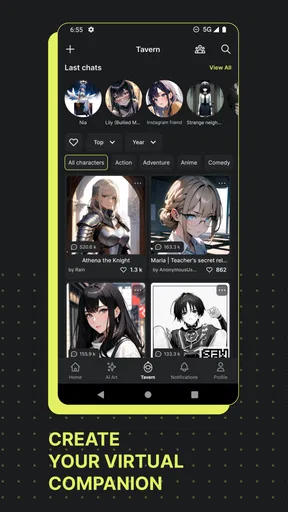
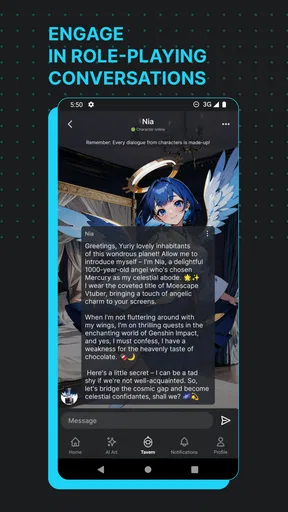
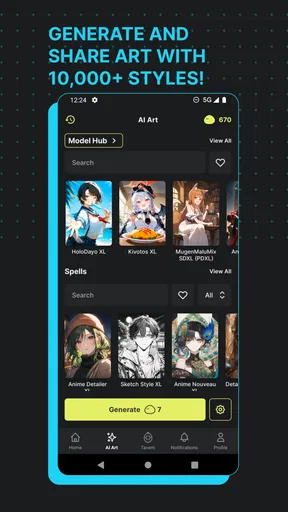
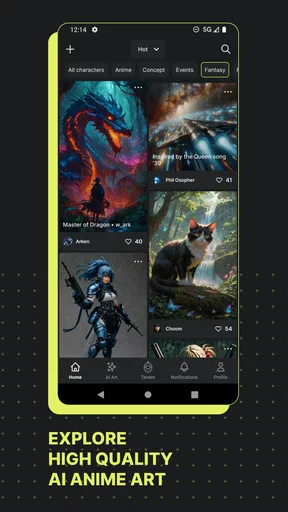
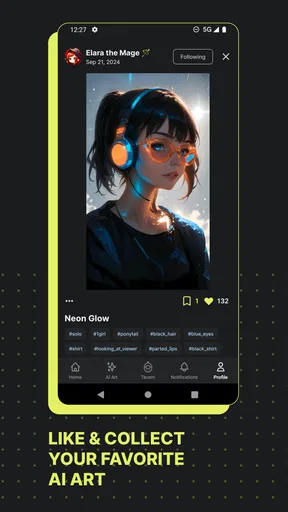
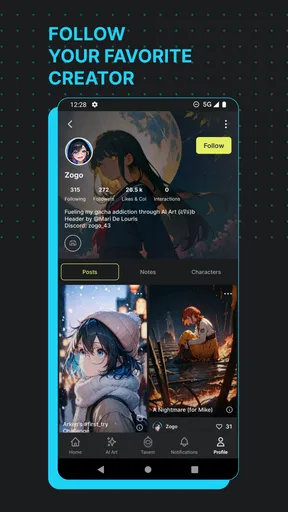
Our Review of Moescape - Character AI & Art
 Analysis by Appyee
I approached Moescape as an entertainment app built around a simple but unusually flexible idea: chatting with AI characters while using those conversations as a starting point for anime-style creative work. That combination matters because it changes the experience from a basic chatbot into something closer to an interactive character studio. I can begin with a roleplay conversation, adjust the direction through my replies, and then move toward visual content when the scene in my head becomes more important than the words.
Developed by Moescape, the app sits in the entertainment category and is free to install. It is aimed at Teen users, which is worth keeping in mind before handing it to younger family members. The current version is 1.23.0, and the app requires Android 10 or later. Its audience is already substantial, with more than half a million installs and an average rating of 4.4 from roughly 9,500 ratings. Those figures suggest that the concept is resonating, but they do not remove the need to understand how the experience actually fits into daily use.
Why the character-to-image workflow is the real attraction
The most interesting capability here is not simply that an AI character can answer messages. Many apps can produce conversational replies. What gives this one a clearer identity is the bridge between roleplay and anime-oriented image or video creation. A character can serve as a conversational partner, a writing prompt, or the voice of a scene that I later want to see represented visually.
That bridge makes the app useful in two different moods. Sometimes I want a light conversation with a fictional personality and have no intention of making anything afterward. At other times, the dialogue helps me discover a character’s attitude, setting, or conflict before I turn that idea into an image. The best results come when I treat the chat as a creative sketchbook rather than expecting it to behave like a perfectly consistent fictional author.
The key benefit is continuity of imagination: I can develop a mood in conversation and then use that mood to guide visual creation without switching immediately to a separate writing tool and a separate art app. That does not make every generated result perfect, but it reduces the distance between “I have an idea” and “I can explore what it looks like.”
This is also where Moescape differs from a standard AI companion app. A companion-focused service usually emphasizes the ongoing relationship, memory, and tone of the conversation. A conventional image generator, meanwhile, asks me to arrive with a prompt. Here, the conversation itself can help produce the prompt in my head. For users who struggle to describe a visual idea from scratch, that is a meaningful advantage.
Starting with a character instead of a blank prompt
When I open an app centered on AI art, the blank input box can be the first obstacle. I may know that I want an anime scene, but not know how to describe the lighting, expression, setting, or emotional tension. A character conversation gives me something to react to. The character’s reply can suggest a direction, and my next message can narrow it down.
I found this approach more comfortable for exploratory work than writing a long prompt immediately. I can begin with a broad situation, see how the character responds, and then refine the scene through ordinary language. That makes the process approachable for someone who enjoys anime storytelling but does not know much about prompt construction.
There is a trade-off, though. Conversational momentum can make me forget that I am shaping an image. If I simply accept whatever the character suggests, the eventual visual concept may drift away from what I originally wanted. I get better control by pausing every few messages and summarizing the details I want to preserve: the character’s appearance, the location, the emotional tone, and the action taking place.
How the experience works in everyday use
A practical session can begin with a small scenario rather than a technical request. I might imagine a quiet meeting on a train platform, a rival pair forced to cooperate, or a fantasy character returning to a familiar village. I then use the roleplay to establish how the characters speak and what they notice. Once the scene feels clear, I shift my attention toward the visual side and describe the moment I want represented.
This workflow is especially useful when I am making several variations of one idea. Instead of starting from zero each time, I can keep the central situation and change one element: the time of day, the character’s expression, the camera angle, or the emotional outcome. That kind of controlled variation is more productive than asking for unrelated pictures one after another, because I can compare what changes and what remains stable.
For a short creative session, I would use the app in three stages:
Establish the character’s personality and the scene through a few natural messages.
Write down the visual details that should not change before requesting a new interpretation.
Make one deliberate change at a time so the result teaches me something about the prompt and the character.
The second step is the one I would emphasize to new users. AI roleplay can feel spontaneous, but visual consistency usually benefits from deliberate repetition. If I want the same character to remain recognizable, I should not rely only on the conversational context. I need to restate the details that matter instead of assuming the system will preserve every nuance automatically.
The app’s image and video focus also changes how I judge a conversation. A reply does not have to be a brilliant piece of prose to be useful. It may still give me a strong pose, a setting, or a conflict that I can build on. Conversely, a charming chat does not guarantee a satisfying visual result. I treat the two parts as connected but separate creative tests.
A realistic evening use case
Imagine I have twenty minutes after work and want to relax without committing to a full game or a television episode. I can open the app, choose a character-driven scenario, and let the conversation develop while I decide what kind of scene I want to explore. If the exchange becomes interesting, I can turn that moment into an anime-style visual concept. If it does not, I can simply leave the session as casual entertainment.
That flexibility is more valuable than it sounds. Traditional roleplaying games often require learning rules, managing a party, or following a fixed objective. A normal streaming service gives me little control over the story. A separate art generator gives me control over the prompt but no character interaction to help me find the idea. Moescape occupies the space between these options: it is interactive enough to respond to me, but lightweight enough for a short creative break.
I can also see it working for someone who keeps ideas in notes but rarely develops them. A character conversation can turn a vague concept into a scene with dialogue and visual cues. The result may not be a finished comic or animation, but it can become a reference for later writing, drawing, or world-building. In that sense, the app is most useful when I regard it as a rapid ideation tool rather than a replacement for a complete production workflow.
Where the convenience starts to show its limits
The first limitation is consistency. AI characters can be engaging, but engagement is not the same as dependable continuity. A character may respond in an entertaining way while gradually losing track of a detail I considered important. The same issue can affect visual work: a character’s clothing, facial features, or proportions may vary between attempts. Anyone expecting a stable cast for a polished series should approach the app cautiously.
The second limitation is control. The conversational format feels natural, but natural language can be imprecise. If I want a very specific composition, I may spend time correcting the direction instead of getting the exact result immediately. A dedicated art tool may be better when I already know the final image and need detailed control over every element.
There is also a financial consideration. The app is free, but it includes in-app purchases ranging from $4.99 to $359.99 per item. That wide range means I would pay close attention to any purchase screen and decide in advance how much experimentation is reasonable for me. Free access is enough to assess whether the character interaction suits my taste, but users who generate frequently should think about their spending before treating the app as an unlimited creative workspace.
I would not recommend approaching the app as a substitute for a private human conversation, a professional writing room, or a serious art pipeline. The entertainment value comes from responding to an artificial character and exploring generated possibilities. It is not the right choice if I need factual research, dependable emotional support, or production-ready visual assets with predictable continuity.
Small habits that improve the results
One useful habit is to separate “story discovery” from “final description.” During the first part, I let the character surprise me. During the second, I become more selective and state exactly what should appear in the scene. Mixing those two modes in every message can create a muddled result because I am asking for improvisation and precision at the same time.
Another helpful approach is to keep a compact character card outside the conversation. I would record the character’s defining appearance, personality, relationships, and setting in my own words. If the roleplay drifts, I can use that summary to guide the next exchange. This is a simple workaround, but it gives me more control than trusting the conversation to preserve every detail indefinitely.
I also recommend judging an image or video idea by its usefulness, not only by its polish. A result with an imperfect detail may still reveal a strong color combination, pose, or mood. Saving those discoveries for a later drawing or writing session makes the app more valuable. If I only accept flawless outputs, I may miss the app’s stronger role as a visual brainstorming partner.
Finally, I would keep age suitability in view. The Teen content rating makes the app more appropriate for older users than for small children, but parents should still decide whether AI roleplay and generated media fit their household rules. The conversational nature can make the experience feel personal, so it is sensible to treat it as entertainment and to avoid sharing sensitive real-world information.
Who will get the most from it
I think Moescape is best for anime fans who enjoy character interaction but also want a visual outlet for their ideas. It suits people who like improvising scenes, testing personalities, and seeing how a fictional exchange might look as an image or video. It is also a good fit for beginners who feel blocked by a blank art prompt and would rather discover a concept through dialogue.
Writers may find it useful during early brainstorming, especially when they want to test how a character might react under pressure. Artists can use it to explore references and moods, provided they are willing to refine the results elsewhere. Casual users may simply enjoy the novelty of having a fictional conversation that can lead somewhere visual.
I would steer a different user toward another kind of tool: someone who wants a deeply consistent long-term companion, someone who needs exact artistic control, or someone who dislikes the unpredictability of generative systems. A conventional roleplaying game is better when rules and objectives matter. A dedicated image editor is better when precision matters. A standard streaming app is better when I want to relax without making choices.
My final take on the experience
Moescape succeeds because it connects two activities that are often separated: talking through a fictional idea and giving that idea an anime-style visual form. In my experience, the conversation is most valuable when it helps me discover what I want to create, while the image and video side gives that discovery a more tangible direction.
The app is not a magic shortcut to consistent characters or finished artwork. I need to guide it, repeat important details, and accept that some experiments will be more useful than others. The purchase range also makes moderation important, particularly for users who become enthusiastic about repeated generations.
Still, as a free entertainment app from Moescape, it offers a distinctive way to spend a short session. I would recommend it to a friend who enjoys anime, improvisational storytelling, and creative experimentation, especially if that friend wants help moving from a vague idea to a scene. If you treat it as an interactive sketchbook rather than a perfect production tool, its character-to-visual workflow becomes genuinely enjoyable.
The app was released on September 23, 2024, and has reached a level of adoption that makes it easy to understand why the format appeals to people. My recommendation is measured rather than unconditional: try it for the roleplay-to-art connection, set a personal spending limit, and keep your expectations realistic about continuity. For the right user, that combination is more engaging than a plain chatbot and more approachable than beginning with a demanding art prompt.
Verdict
Strengths of Moescape - Character AI & Art
- Offers a wide range of AI characters and roleplay personalities.
- Character creation tools allow personalized prompts and backstories.
- Supports AI-generated artwork alongside text-based conversations.
- Useful for creative writing, brainstorming, and fantasy scenarios.
- Frequent community content provides new characters to discover.
Limitations of Moescape - Character AI & Art
- Some advanced features may require a paid subscription or credits.
- AI responses can occasionally be repetitive, inaccurate, or out of character.
- Generated images may vary in quality and need several attempts.
- Public character content may not suit younger users or all audiences.
- Privacy terms should be reviewed before sharing personal conversation details.
Similar Picks in This Category
View All
Google Play Games
Google LLC3.9

Netflix
Netflix, Inc.4.8

YouTube Kids
Google LLC4.2

Disney+
Disney4.4

Prime Video
Amazon Mobile LLC4.7

Steam
Valve Corporation3.2
Frequently Asked Questions
What is Moescape – Character AI & Art used for?
Moescape – Character AI & Art is an AI-powered platform for creating and interacting with fictional characters. Users can chat with AI personalities, develop original characters, and generate artwork from text prompts or creative ideas. It is aimed at people who enjoy roleplay, storytelling, anime-inspired content, and experimenting with generative AI tools in one application.
Can I create my own AI characters in Moescape?
Yes. Moescape allows users to design custom AI characters by defining details such as the character’s name, personality, background, appearance, and conversation style. These settings help shape how the character responds during chats. The quality of the experience depends heavily on the instructions and description provided, so more specific character profiles generally produce more consistent results.
Does Moescape generate AI images as well as text conversations?
Moescape combines character conversations with AI art-generation features. Depending on the available tools and account permissions, users can describe a scene, character, or visual style and receive generated artwork. Results may vary in accuracy, consistency, and artistic style, especially with complex prompts. Some advanced generation options may also require credits, limits, or a paid subscription.
Is Moescape free to download and use?
The application may be downloaded without an upfront purchase, but free access can include restrictions such as daily message limits, image-generation credits, advertisements, or fewer customization options. Certain features may be available only through in-app purchases or a subscription. Before spending money, users should review the current pricing, renewal terms, and included benefits shown in the app store or inside the application.
Is Moescape appropriate for children and safe to use?
Moescape is designed for AI conversations and creative content, so users should check its current age rating and content rules before installing it. AI characters may produce unexpected, inaccurate, or mature responses depending on the conversation and settings. Parents should use device-level controls where appropriate, avoid sharing personal information in chats, and remember that generated content is not always moderated perfectly or suitable for younger users.
